
Embed Badge Verification on Your Website (No Iframe, No SDK)
Add a small JavaScript snippet (or a server-side fetch) to your site that verifies any Open Badge against a public JSON-LD endpoint. No iframe, no third-party tracker.
 By Nacho Coll
 Nacho founded Badges Ninja to make issuing verifiable digital credentials as simple as a single API call — Open Badge v2.0 badges and certificates, minted, hosted, and verifiable without standing up your own issuer infrastructure.
If you issue credentials, sooner or later someone asks: “how do I know this badge is real?” The honest answer should never be “trust the PNG.” Open Badge v2.0 solves this with a public, machine-readable verification endpoint, and putting a “Verified” widget on your own site takes about ten lines of code — not an iframe, not a third-party embed script, and not an SDK.
This post shows exactly how to call the endpoint and render the result, in vanilla JavaScript and on the server in Node and Python. It also covers what “verification” actually checks, where the endpoint fits next to the human-facing pages badges.ninja already gives recipients, and the mistakes that make a verification widget look done while quietly proving nothing.
What “verified” actually means
An Open Badge v2.0 assertion is a JSON-LD document with a fixed shape: the assertion itself (who received it, when), a reference to the BadgeClass (what it is, who defines the criteria), and a reference to the issuer profile (who is vouching for it). When you “verify” a badge, you’re really checking three separate things:
- Does the assertion exist and resolve. The award ID is real, not guessed or tampered with.
- Has it been revoked. An issuer can revoke a badge after the fact — a credential issued in error, a policy violation, a certification that lapsed — and a correct verifier must surface that, not just confirm the record exists.
- Does the chain hold together. The assertion’s badge and issuer references actually resolve to real, matching records, not orphaned or mismatched IDs.
A verification widget that only pings a URL and checks for a 200 status misses point 2 entirely. A revoked assertion still resolves fine — it just carries a revocation flag in the payload. If your widget only checks “did the request succeed,” a revoked credential will render as verified, which is worse than having no widget at all.
The public human page vs. the API endpoint
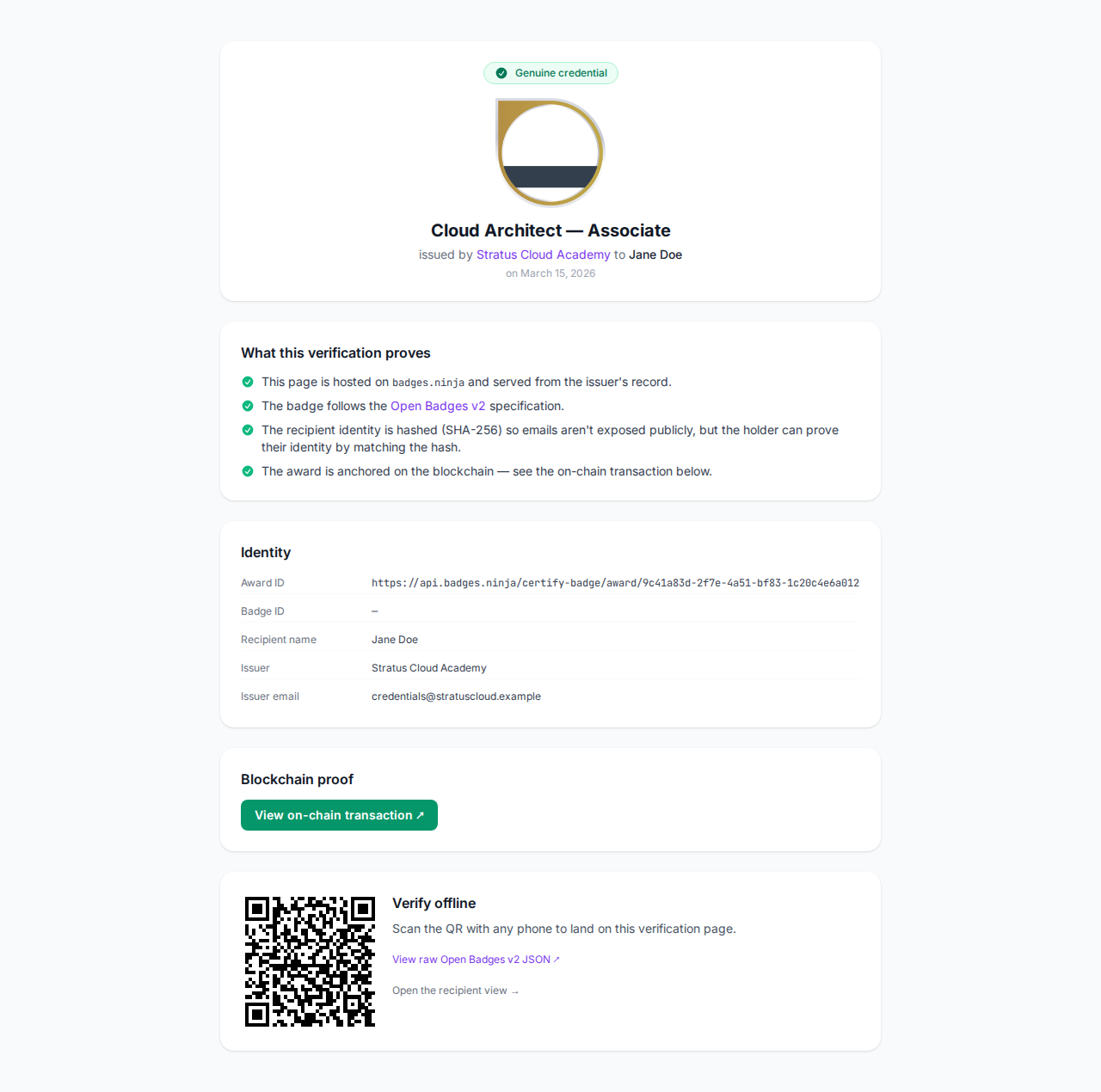
Every award issued on https://badges.ninja gets a public URL recipients can share directly, with no signup required to view it:
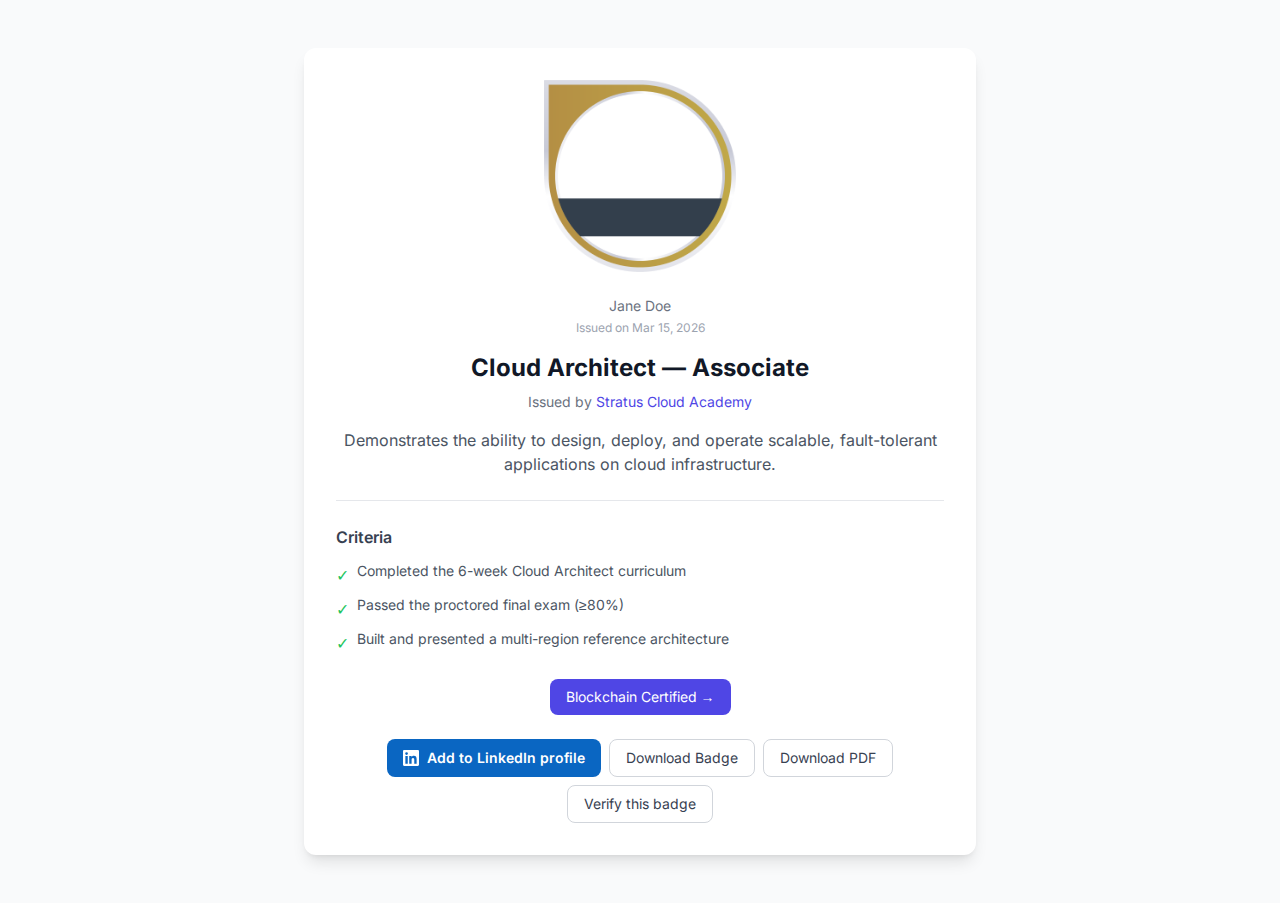
That page is what most recipients will link to from LinkedIn, a resume, or an email signature — it’s built for humans, shows the badge image, the issuer, and the issue date, and needs nothing from you to work. The API endpoint below returns the same underlying assertion as structured JSON-LD, which is what you want when you’re building your own UI instead of just linking out to ours.
The endpoint
GET https://api.badges.ninja/certify-badge/award/{guid}No auth header required — this is intentionally public, because the entire point of Open Badges is that anyone (an employer, a recruiter, a licensing board) can verify a credential without an account. Full contract details, including the exact field names in the returned assertion, are in the verification docs.
Pass the award’s GUID, which you’ll have either from your own issuance records or parsed out of a badges.ninja/awards/<guid> link a recipient shared with you.
Vanilla JS: fetch and render
This is the whole widget. No build step, no npm package, drop it straight onto any page:
<div id="badge-verify"></div>
<script>
  async function renderBadgeVerification(awardId, mountId) {
    const el = document.getElementById(mountId);
    el.textContent = "Checking badge status";
    try {
      const res = await fetch(
        `https://api.badges.ninja/certify-badge/award/${awardId}`
      );
      if (!res.ok) {
        el.textContent = "Credential not found.";
        return;
      }
      const assertion = await res.json();
      // —— revocation check first, a resolvable assertion isn't enough on its own
      if (assertion.revoked) {
        el.textContent = `Revoked: ${assertion.revocationReason || "no reason given"}`;
        return;
      }
      el.textContent = `Verified, issued ${new Date(assertion.issuedOn).toLocaleDateString()}`;
    } catch (err) {
      el.textContent = "Verification check failed.";
    }
  }
  renderBadgeVerification("REPLACE_WITH_AWARD_ID", "badge-verify");
</script>
Swap REPLACE_WITH_AWARD_ID for a real award GUID. That’s the entire client-side integration: no iframe boundary to fight with CSS, and no third-party script pulling in its own analytics or tracking pixels alongside the verification check.
Server-side: Node
If you’d rather verify on your backend — say, before displaying a “Verified Partner” badge on a profile page you control, or before accepting a credential as proof in an onboarding flow — the fetch is identical minus the DOM part:
async function verifyAward(awardId) {
  const res = await fetch(
    `https://api.badges.ninja/certify-badge/award/${awardId}`
  );
  if (!res.ok) return { verified: false, reason: "not_found" };
  const assertion = await res.json();
  if (assertion.revoked) {
    return { verified: false, reason: assertion.revocationReason || "revoked" };
  }
  return { verified: true, issuedOn: assertion.issuedOn, badge: assertion.badge };
}
Server-side: Python
import requests
# —— resolve the assertion, then check revocation before trusting it
def verify_award(award_id):
    res = requests.get(f"https://api.badges.ninja/certify-badge/award/{award_id}")
    if res.status_code != 200:
        return {"verified": False, "reason": "not_found"}
    assertion = res.json()
    if assertion.get("revoked"):
        return {"verified": False, "reason": assertion.get("revocationReason", "revoked")}
    return {"verified": True, "issued_on": assertion.get("issuedOn"), "badge": assertion.get("badge")}
Both examples treat a non-200 response as “not found” rather than throwing. A broken or guessed award ID is an expected input for a public verification endpoint, not an exceptional one, so handle it as a normal branch rather than a caught error.
Styling the result instead of embedding someone else’s UI
Because the widget above is just a fetch call into your own DOM, you own every pixel of it. A common pattern is three visual states mapped straight off the response:
- Verified — a green check plus “Verified” and the issue date, styled to match your site’s badge/tag components.
- Revoked — a muted or red state that shows the revocation reason rather than hiding it. Recipients and third parties both benefit from an honest “why,” not a silent failure.
- Not found — treat this the same as “revoked” visually (don’t render a fake success state), but with different copy, since a bad ID and a deliberate revocation are different situations for whoever’s reading the page.
None of this requires a component library. A switch on verified / revoked / not_found and three CSS classes covers it.
Caching, so you’re not hammering the endpoint
The verification endpoint is public and unauthenticated, which also means there’s no per-request credit cost to worry about — but it’s still a network round trip on every page load if you call it client-side with no caching. For a page that displays the same badge to every visitor (a “Verified Partner” footer badge, for instance), cache the result server-side with a short TTL — five to fifteen minutes is plenty, since revocations aren’t a fast-moving signal — rather than re-fetching on every request:
const cache = new Map();
async function verifyAwardCached(awardId, ttlMs = 10 * 60 * 1000) {
  const hit = cache.get(awardId);
  if (hit && Date.now() - hit.at < ttlMs) return hit.result;
  const result = await verifyAward(awardId);
  cache.set(awardId, { result, at: Date.now() });
  return result;
}
For a per-visitor widget (a recipient embedding their own credential on a personal site), skip the cache and just call it fresh on page load — the extra request is negligible at that scale.
What badges.ninja already gives recipients
Before you build a fully custom embed, it’s worth knowing what’s already available out of the box. Every award’s public page includes ready-made share and embed snippets recipients can copy directly, no code required on their end:
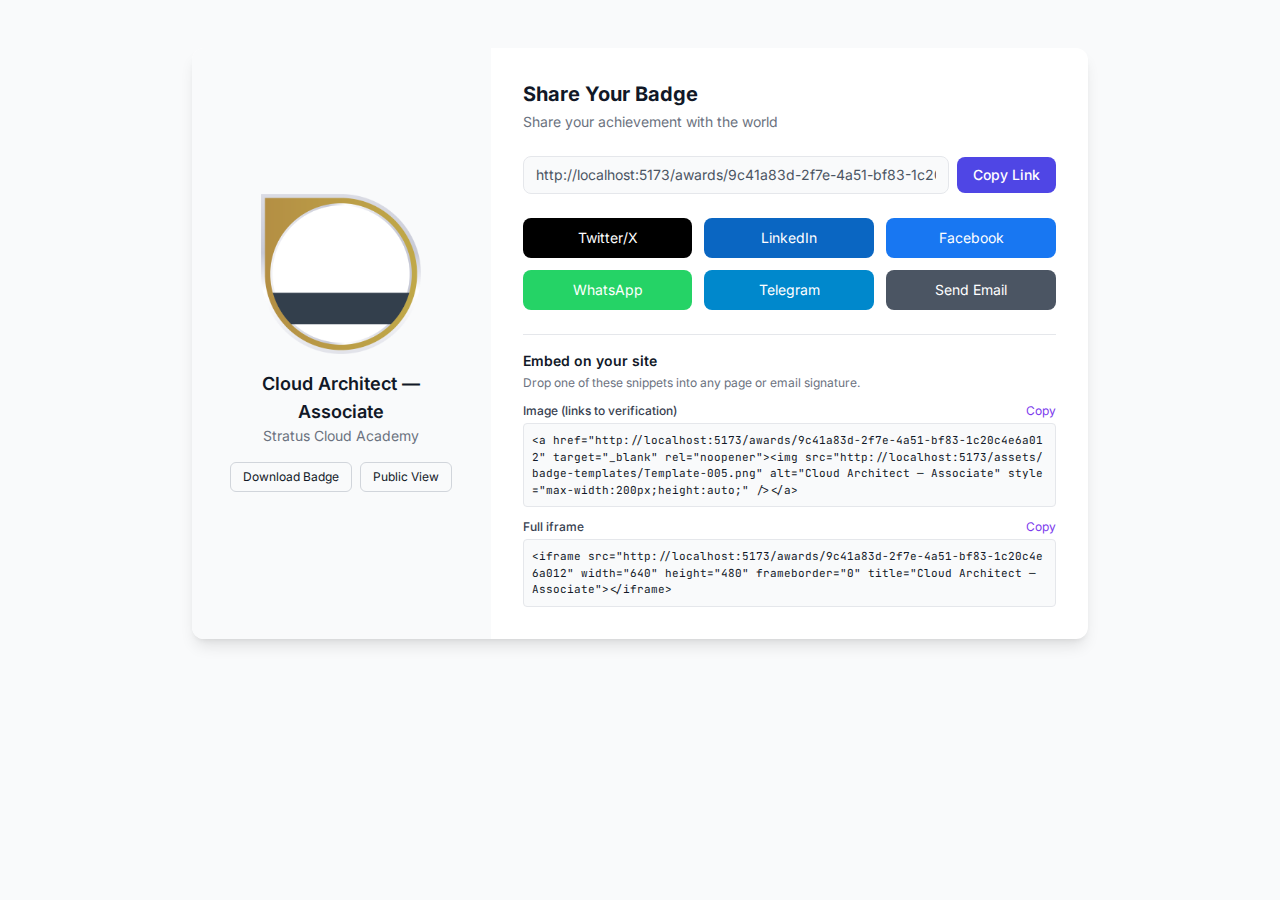
If your use case is “let a recipient show their badge is real,” linking to their badges.ninja/awards/<guid> page is often simpler than building a custom widget at all — it’s the human page shown earlier, and it already handles the verified/revoked distinction for you. Build the custom widget from this post when you need the verification status rendered inside your own product’s UI — a partner directory, an internal audit dashboard, a hiring tool checking a candidate’s claimed certifications — where linking out to a different site isn’t the right UX.
Why not an iframe or a vendor widget?
Some platforms hand you a snippet like <iframe src="https://vendor.example.com/verify-widget"> for embedding verification status. It works, but it comes with real costs: you can’t restyle the contents to match your site (you’re stuck with whatever CSS the vendor shipped), it introduces a cross-origin document your Content-Security-Policy has to explicitly allow, and every page load makes a request to a third party’s iframe host whether or not the visitor cares about verification status at all. A two-call fetch widget avoids all three — it’s your DOM, your styling, and it only runs when you decide to call it.
Walking the full verification chain
If you’re building something more thorough than a status widget — an audit tool that checks a batch of credentials, say, or a compliance report — walk the whole chain rather than stopping at the assertion. The assertion references a badge URL (the BadgeClass: name, description, criteria) and the BadgeClass in turn references an issuer URL (the org profile). A rigorous verifier resolves all three and confirms they’re internally consistent — the badge really belongs to the issuer it claims, the assertion really references the badge it claims — not just that the top-level assertion returns a 200. That’s more depth than a single-credential status widget needs, but it’s worth knowing the shape exists if a partner or auditor ever asks “how deep does your verification actually go?”
Common mistakes to avoid
- Checking only the HTTP status. As covered above, a revoked assertion still resolves. Always read
assertion.revoked, don’t infer verification from status code alone. - Hardcoding the award ID in a shared component. If the widget is meant to be reusable across many recipients’ pages, take the award ID as a parameter (a data attribute, a query string, a prop), not a literal baked into the script.
- Swallowing network errors silently. A
try/catchthat logs nothing and shows the same “not found” text as a genuinely missing badge makes debugging painful later. Distinguish “the network call failed” from “the API said no” in your error branches, at least in logs. - Re-verifying on every render in a client-side app. If the widget lives inside a React or Vue component that re-renders often, verify once per mount (or once per cached TTL window, per the caching section above), not on every re-render.
Does this cost credits, and does it work on the free plan?
No. The verification endpoint is deliberately outside the credit system that governs issuing — checking whether a badge is valid doesn’t cost the issuer anything, and it doesn’t require the visitor calling it to have an account, an API key, or any plan tier at all. That’s true whether the badge was issued on a Free, Starter, or Pro plan: verification is a property of the credential itself, not a feature gated by the issuer’s subscription. It’s also why you can safely put this widget on a public-facing page with unpredictable traffic (a careers page, a partner directory) without worrying about rate limits tied to your account — you’re calling a read-only, public endpoint, not an authenticated API route.
One thing worth being explicit about: the assertion JSON returned by the endpoint does not include the recipient’s raw email address. Recipient email is stored hashed on the backend precisely so that a public verification response can’t be scraped for personal contact information — what you get back is enough to confirm the credential (badge, issuer, dates, revocation status) without turning the endpoint into a lead-generation tool for anyone who iterates over award IDs.
Ready to issue your first verifiable credential?
Start free at badges.ninja — visual designer, public verification page, PDF certificate, Open Badge v2.0 output. No credit card required.
For the full annotated structure of every field in an assertion, see the JSON-LD field reference. And if you’re issuing credentials programmatically rather than just verifying them, the API quickstart covers authentication and the award-creation call this endpoint’s output comes from.
Related reading: Free digital badge & certificate maker → · Badges Ninja plans & pricing · Credly alternative · Certifier alternative · Cheapest Open Badges platform · Best Open Badges platforms (ranked)
About the author
Nacho Coll
Founder & Engineer at Badges Ninja
Nacho founded Badges Ninja to make issuing verifiable digital credentials as simple as a single API call — Open Badge v2.0 badges and certificates, minted, hosted, and verifiable without standing up your own issuer infrastructure. Writes about the Open Badges spec, credential verification, and running a credentialing platform serverless on AWS, from the operator side of the wire.