
Open Badges vs PDF Certificates: Which Is Right for Your Program in 2026?
PDF certificates are easy but hard to verify and easy to forge. Open Badges add cryptographic verification, sharing, and analytics. When each makes sense.
 By Nacho Coll
 Nacho founded Badges Ninja to make issuing verifiable digital credentials as simple as a single API call — Open Badge v2.0 badges and certificates, minted, hosted, and verifiable without standing up your own issuer infrastructure.
If you run any kind of training, certification, or recognition program, you already have a certificate template sitting in a folder somewhere — a PDF with a gold seal, a signature line, and a spot for the recipient’s name. It has worked for decades. So why are so many programs quietly replacing it with something called an Open Badge?
The short answer: a PDF is a picture of an accomplishment. An Open Badge is a verifiable record of one. In 2026, with credential fraud on résumés at an all-time high and recruiters spending less than ten seconds per candidate screen, that difference matters more than it used to. But PDFs aren’t dead, and pretending otherwise would be dishonest. Here’s the real comparison — where each format wins, where it breaks down, and why most programs end up shipping both.
What a PDF certificate actually is
A PDF certificate is a static document. Someone designed it in a template tool, merged in a name and a date, and generated a file. That file is:
- Portable — it opens anywhere, forever, with no dependency on a platform staying online.
- Familiar — recipients, hiring managers, and compliance auditors all recognize the format instantly.
- Trivially editable — which is exactly the problem. Any PDF editor can change the name, the date, or the course title in under a minute. There is no cryptographic binding between the document and the claim it makes.
- Unverifiable at scale — if an employer wants to confirm a certificate is real, their only option is to email the issuer and wait. Nobody does this for an entry-level applicant.
PDFs also carry zero data about what the recipient actually did. There’s no structured record of the skills covered, the criteria for earning it, or who issued it in a machine-readable way. It’s a picture, not a record.
What an Open Badge is
An Open Badge v2.0 credential is a small piece of structured, cryptographically-verifiable data (JSON-LD) that describes three things: the issuer (who’s making the claim), the BadgeClass (what was earned and the criteria for earning it), and the assertion (that a specific recipient earned it, and when). That data lives behind a public, permanent verification URL — no login required.
Practically, this means:
- Anyone can verify it in one click. A recruiter, a licensing board, or a curious LinkedIn connection can visit the verification page and see the credential is real, unaltered, and tied to a real issuer — not a document someone edited in Preview.
- It’s shareable as a living object, not a static file. Recipients post the verification link (or the badge image itself) to LinkedIn, and it renders as a proper social preview card with the issuer’s identity attached.
- The issuer gets data back. Every award has a unique verification URL, so you can see how many times a credential was viewed or shared — something a PDF sitting in someone’s Downloads folder will never tell you.
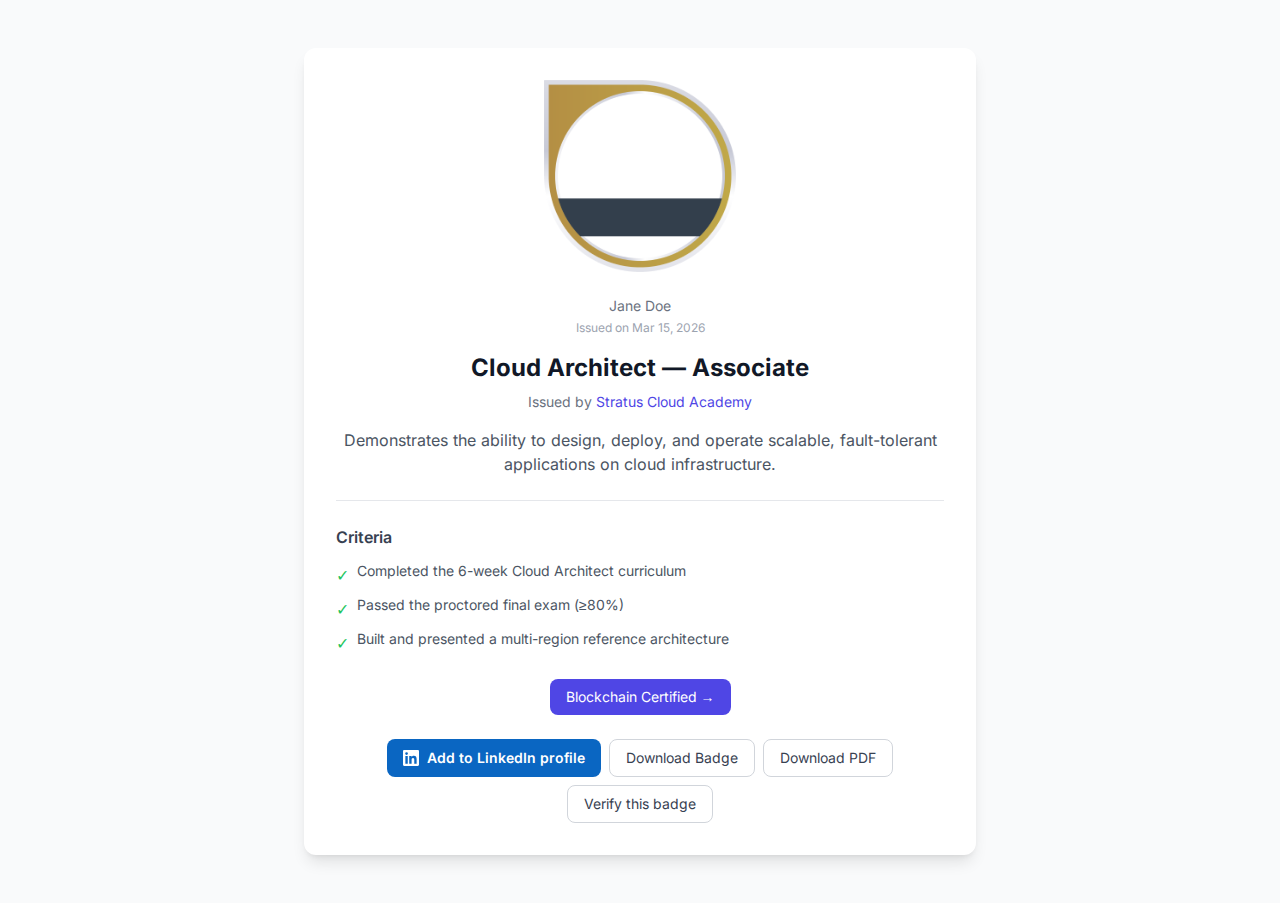
Here’s what a public award page looks like on the recipient’s end:
The honest trade-offs
Neither format is strictly better. Here’s where each one wins:
| PDF Certificate | Open Badge | |
|---|---|---|
| Verification | Manual (email the issuer) | One click, public URL |
| Forgery resistance | Low — trivially editable | High — issuer-signed, hosted record |
| LinkedIn shareability | Attach as a file; no preview, no verification | Native share card + Add-to-Profile |
| Offline access | Always works | Requires visiting the verification URL (though badges can also be baked with the JSON embedded) |
| Setup effort | A design template and a mail merge | An issuer account, a badge template, an award |
| Analytics | None | View/share counts per award |
| Compliance/audit trail | You keep your own records | Public verification URL is the audit trail |
| Familiarity | Everyone recognizes it instantly | Growing but not universal — some recipients ask “what’s this link?” |
That last row is real. If your audience is 60-year-old compliance officers who want a printable document for a physical file, a bare Open Badge link can feel unfamiliar. This is why the best programs don’t force a choice.
Why most programs ship both
The most common pattern we see across university microcredential programs, bootcamps, and corporate compliance training isn’t “PDF or badge” — it’s “PDF and badge, generated from the same award.” The recipient gets a familiar, printable A4 PDF certificate for their records and a verifiable Open Badge with a public verification URL, a QR code, and LinkedIn sharing — all from a single issuance action.
That’s the model badges.ninja uses: when you award a badge, the platform generates the visual credential, the public verification page, and a downloadable PDF certificate simultaneously. You’re not choosing a format — you’re choosing which one to hand the recipient first, and they get both.
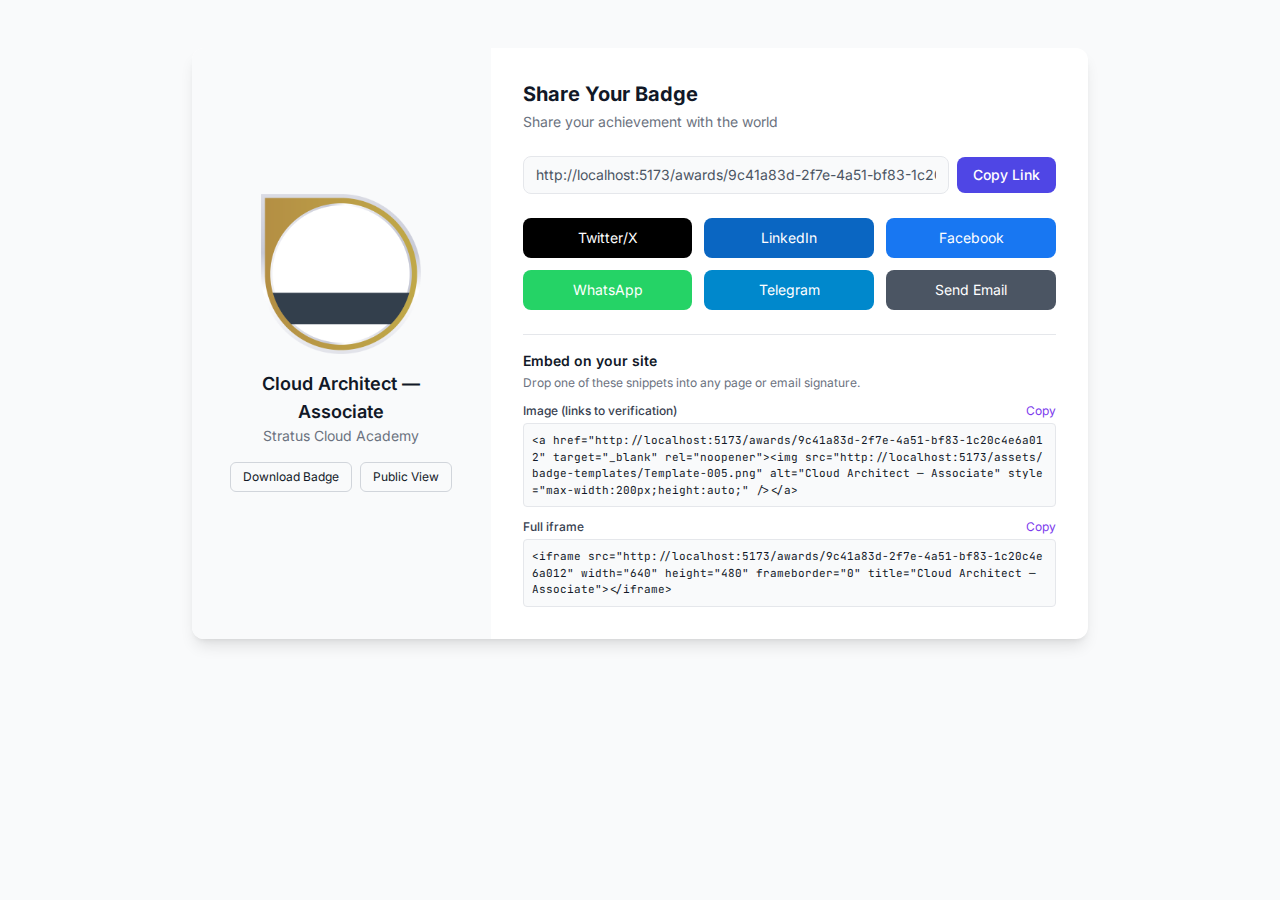
Here’s the share page a recipient sees, with the PDF download sitting right next to the social and embed options:
A concrete scenario
Say you run a 200-person annual compliance training. Historically, HR generates 200 PDFs from a mail-merge template, emails them out, and files copies for the audit. Two problems surface every year: someone loses their PDF and asks HR to resend it eight months later, and during an actual audit, there’s no fast way to prove which 200 people actually completed training versus who just received an email.
Switch to Open Badges and both problems disappear. Recipients access their credential permanently through a magic-link recipient portal — no password to lose, no “please resend” tickets. And the audit trail is the verification URL itself: a compliance officer (or an external auditor) can check any individual’s credential status in seconds, without asking HR to dig through a shared drive. If you still want a printed copy for a personnel file, the PDF is one click away on the same award.
When to stick with plain PDFs
Be honest with yourself about a few cases where Open Badges add friction rather than value:
- One-off, informal recognition where nobody will ever need to verify it (a thank-you certificate for a single volunteer shift).
- Fully offline environments with no reliable internet access for either issuer or recipient.
- Audiences who will never share it digitally and only need a printed artifact — though even here, the “both” model costs you nothing extra.
For anything tied to a credential’s credibility — professional certifications, compliance records, bootcamp completions, CE credits — the verification gap is the whole point, and a static PDF can’t close it.
Getting started
If you’re currently PDF-only, the migration isn’t a rebuild. You can issue your first badges from a CSV of existing recipients in a few minutes, using the same names and dates already sitting in your spreadsheet. Design a badge template once, bulk-award it retroactively, and every recipient gets both a verifiable badge and a downloadable PDF — with the trust and shareability a flat document was never built to provide.
Ready to issue your first verifiable credential? Start free at badges.ninja — visual designer, public verification page, PDF certificate, Open Badge v2.0 output. No credit card required.
Related reading: Free digital badge & certificate maker → · Badges Ninja plans & pricing · Credly alternative · Certifier alternative · Cheapest Open Badges platform · Best Open Badges platforms (ranked)
About the author
Nacho Coll
Founder & Engineer at Badges Ninja
Nacho founded Badges Ninja to make issuing verifiable digital credentials as simple as a single API call — Open Badge v2.0 badges and certificates, minted, hosted, and verifiable without standing up your own issuer infrastructure. Writes about the Open Badges spec, credential verification, and running a credentialing platform serverless on AWS, from the operator side of the wire.